

If you’re wondering how to add money to Venmo, you’re not alone. Millions of people use Venmo daily to split bills, pay friends, shop online, and even manage small business transactions. But understanding exactly how to fund your Venmo balance—safely, instantly, and without unnecessary fees—can make a big difference in your financial experience.
Venmo, owned by PayPal, has evolved into more than just a peer-to-peer payment app. With features like the Venmo Debit Card and direct deposit, users now treat Venmo almost like a digital wallet or checking account.
Understanding How to Add Money to Venmo Balance
Before diving into the steps, it’s important to understand what “adding money” actually means inside the Venmo ecosystem. Many users don’t realize that Venmo works slightly differently from traditional banking apps.
Venmo allows payments directly from linked bank accounts, debit cards, or credit cards—even without maintaining a balance. However, if you want to preload funds into your Venmo wallet, you must complete identity verification.
Key Things to Know About Adding Money to Venmo
• Venmo Balance vs Linked Funding Source
When you pay someone on Venmo, the app can pull money directly from your bank account or debit card. But adding money to your Venmo balance means transferring funds ahead of time so they sit in your Venmo wallet. This is helpful if you want faster transactions or to use your Venmo Debit Card for purchases without waiting for bank processing.
• Identity Verification Is Required
To add money manually to your Venmo balance, you must verify your identity through SSN confirmation. This complies with U.S. financial regulations and anti-money laundering laws. Without verification, Venmo may restrict balance features.
• Standard Transfer Timeframe
Adding money from a bank account typically takes 3–5 business days. This is important for planning payments. If you need funds immediately, you’ll want to explore instant transfer options.
• Minimum and Maximum Limits
Venmo sets limits on how much you can transfer per week. These limits may vary based on account verification level and account history.
• No Fee for Standard Bank Transfers
Standard transfers from a linked bank account are usually free. However, instant funding options may include small percentage-based fees.
• Security and Fraud Protection
Venmo uses encryption and fraud detection systems to protect your transactions. Always enable two-factor authentication for extra safety.
Also Read:- How to AirPlay to TV: The Complete Step-by-Step Guide (2026)
How to Add Money to Venmo Account Step by Step
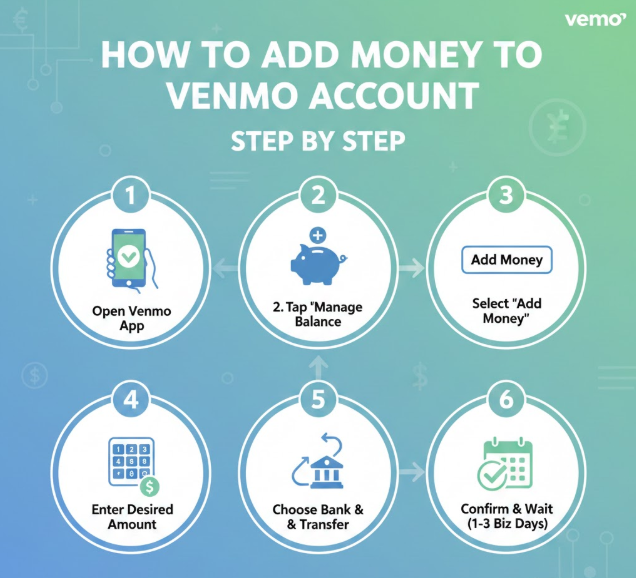
If you’re searching for how to add money to Venmo account manually, follow these detailed instructions.
Step-by-Step Instructions (Mobile App)
• Open the Venmo App and Log In
Launch the Venmo app on your iPhone or Android device. Ensure you’re logged into your verified account. If you haven’t verified your identity yet, complete that step first in the Settings section.
• Tap the “Me” Tab
Navigate to your profile by tapping the “Me” icon in the bottom right corner. This section displays your current Venmo balance and account information.
• Select “Manage Balance”
If eligible, you’ll see an option labeled “Manage Balance.” Tap it to access transfer and funding options.
• Tap “Add Money”
Choose the “Add Money” button. Enter the amount you want to transfer from your linked bank account.
• Choose Your Linked Bank Account
Select the bank account you previously linked. Venmo only allows adding money from verified bank accounts, not credit cards directly.
• Confirm the Transfer
Review the amount and confirm. The transfer will begin processing and typically completes within several business days.
Also Read:- How to Make Alfredo Sauce: The Ultimate Creamy Guide for Home Cooks
How to Add Money to Venmo Instantly

Sometimes you need funds immediately. Whether you’re paying rent or making a last-minute purchase, knowing how to add money to Venmo instantly can be critical.
Instant Funding Options
• Instant Bank Transfers (If Eligible)
Venmo offers instant transfers for certain banks. Instead of waiting 3–5 days, funds can appear within minutes for a small fee (usually around 1–1.75%).
• Receive Money from Another User
One of the fastest ways to increase your Venmo balance is receiving a payment from a friend. Once received, it becomes available instantly in your Venmo wallet.
• Direct Deposit Setup
You can route part of your paycheck directly into Venmo. This method is instant on payday and avoids manual transfers.
• Using Venmo Debit Card Reloading
When using your Venmo Debit Card, purchases can automatically pull funds from your linked bank if your balance is low, reducing the need for manual transfers.
• Debit Card Funding for Payments
While you cannot preload balance directly from a debit card, Venmo can use it instantly as a payment method when sending money.
• Understanding Instant Fees
Instant transfers usually include a fee. Always compare whether speed is worth the added cost.
Also Read:- How to Change Apple ID Password: Complete Step‑by‑Step Security Guide
How to Add Money to Venmo Without a Bank Account

Some users don’t have traditional bank accounts. If you’re looking for how to add money to Venmo without a bank account, here are practical alternatives.
Alternative Funding Methods
• Use a Linked Debit Card
You can attach a prepaid or traditional debit card to your account. While you can’t “add” balance manually from it, you can use it directly for payments.
• Receive Payments from Others
If someone sends you money, it appears in your balance instantly—even if you don’t have a linked bank account.
• Set Up Direct Deposit
Venmo provides routing and account numbers. This allows you to deposit paychecks directly into Venmo without using a traditional bank.
• Use Cash-to-Digital Services
Some third-party services allow converting cash into digital deposits that can then be transferred.
• ATM Deposits (Limited Availability)
Some users with Venmo cards may access cash reload options depending on regional availability.
• Consider Linking to Online Banks
Online banks often have lower requirements than traditional institutions and integrate seamlessly with Venmo.
Also Read:- How to Make Pancakes: The Ultimate Step-by-Step Guide for Perfect Results
How to Add Money to Venmo from Debit Card

Many users search how to add money to Venmo from debit card. The process works differently than most expect.
Important Clarifications
• You Cannot Directly Transfer Balance from Debit Card
Venmo does not allow manual balance reload from debit card like a prepaid wallet.
• Debit Card Can Fund Payments Instantly
When sending money, choose your debit card as the funding source. This bypasses the need to preload balance.
• Venmo Debit Card Auto Reload
If you own the Venmo Debit Card, it can automatically pull funds from your linked bank when needed.
• Debit Card Verification Required
Always verify your debit card with micro-deposits or authentication steps.
• Watch for Bank Declines
Some banks restrict peer-to-peer apps. Contact your bank if transactions fail.
• Security Recommendations
Avoid linking debit cards on public Wi-Fi networks.
Also Read:- How to Make Extra Money: The Ultimate Guide to Boost Your Income
How to Add Money to Venmo from Credit Card

Credit cards work differently.
• Venmo allows sending money using a credit card
• A 3% fee typically applies
• You cannot directly preload balance from a credit card
• Some banks classify it as cash advance
• Rewards may not apply
• Always check issuer policies
Also Read:- How to Clean Grout: The Ultimate Guide for Sparkling Tiles
How to Add Money to Venmo Card and Wallet

If you use the Venmo Debit Card, here’s what you should know.
• The Venmo card uses your Venmo balance
• Auto reload feature pulls from linked bank
• Enable notifications for low balance
• Track transactions in real time
• ATM withdrawals may include fees
• Use in-store and online like regular debit
Also Read:- How to Pair Roku Remote: Complete Step-by-Step Guide
Conclusion
Understanding how to add money to Venmo gives you better control over your digital finances. Whether you’re funding your balance, using a debit card, receiving direct deposit, or exploring instant options, the key is choosing the method that fits your speed, fee tolerance, and security preferences.
Venmo continues to evolve in 2026, offering more flexibility than ever. By following the steps and best practices in this guide, you can confidently manage your Venmo account like a pro.
FAQs
Can I add money to Venmo instantly?
Yes, via instant bank transfer or receiving payments.
Is there a fee to add money?
Standard transfers are free; instant transfers may include fees.
Can I add money from a credit card?
Not directly to balance, but you can send payments with a fee.
Why can’t I see “Add Money”?
You may need to verify your identity.
Is Venmo safe?
Yes, when using strong passwords and two-factor authentication.
Visit For More Information Go To entrepreneurideas